Identity propagation for AI agents
Agents should act as the person who asked.
When an AI agent reads or changes business records, the system of record should see the signed-in user, apply that user's permissions and record that user's name. This page explains the pattern behind three public samples, and where it stops.
The shortcut that hides who acted
Many agent integrations call business systems with one shared service account. It works in a demo. In production, every lookup and update lands in the audit log as the same technical user, whoever asked.
That account also has to cover anything any user might do, so it collects everyone's permissions and bypasses the per-user rules the systems already enforce. When someone asks who changed a record, a shared credential has no answer.
| Shared service account | Identity propagation | |
|---|---|---|
| Audit trail | Every action shows the integration account | Every action shows the signed-in person |
| Permissions | One credential with the union of everyone's access | Each request carries only that user's access |
| Authorization | Rebuilt in middleware, or skipped | Enforced by each system, for each caller |
| Traceability | Hard to tie an AI action to a person | Individual accountability in the data path |
How the identity travels
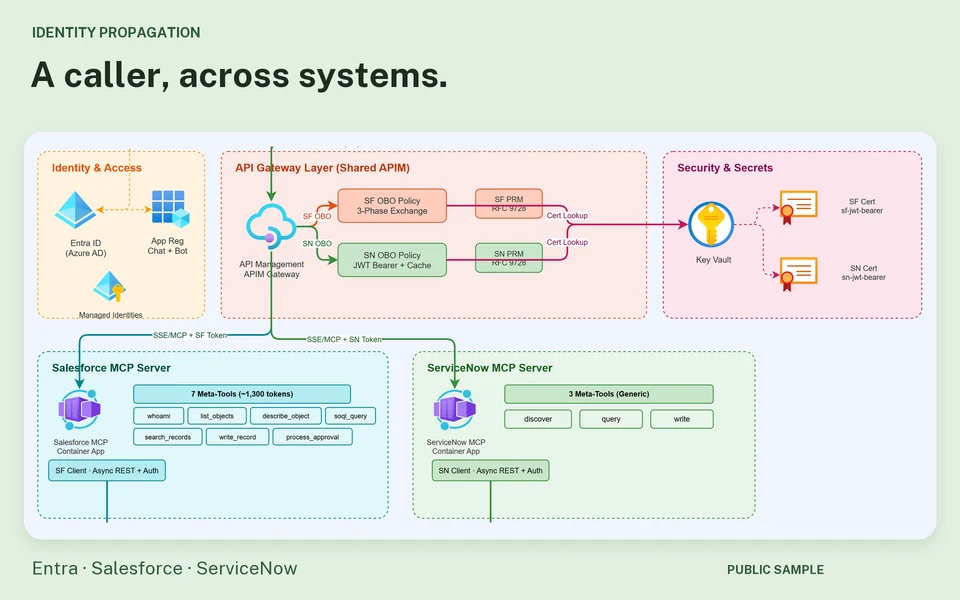
The user signs in once. The same identity then rides along on every hop, and each hop checks it before passing the request on.
- Sign in onceThe person signs in with Microsoft Entra ID, in Teams, Microsoft 365 Copilot or a web chat.
- The agent calls tools with the user's tokenA Microsoft Foundry agent chooses the tools and calls them, through the Model Context Protocol (MCP), with the user's token rather than its own credential.
- A gateway checks and exchanges the tokenAzure API Management validates the token, then obtains a token for the same person in the target system, for example with the OAuth 2.0 on-behalf-of flow.
- Each system applies its own rulesSalesforce sharing rules and field-level security, ServiceNow access controls or your own API decide what this person may see and change.
- The record names the personWrites show the user, such as Last modified by in Salesforce or Created by in ServiceNow, not an integration user.
Public samples to inspect
Each one is separately scoped. Their repositories document the exact flows, policies and setup.
- Customer 360 Assistant ↗One Foundry agent in Teams works across Salesforce and ServiceNow as the signed-in user. Project page and a 2:40 video.
- Salesforce meta-tool, the Customer 360 source ↗A few generic tools discover Salesforce objects at runtime, and each per-user token exchange appears in Salesforce Login History.
- ServiceNow meta-tool ↗Three generic tools (discover, query, write) with on-behalf-of access, so records show the real creator.
- Entra ID identity flow ↗Proof of concept: browser, Foundry agent, MCP tool and API Management to a backend API, with no service account in the data path.
Carry identity. Still enforce permissions.
Propagation gives every system the right subject. It does not make the rest of the design safe on its own.
- Authorization still lives in each system. Roles, sharing rules, access controls and token scopes must be right; propagation only makes sure they apply to the right person.
- An agent can still misread intent. Keep confirmations for destructive actions, and a human decision where the agent's mandate ends.
- Consent and token lifetimes need a plan. Users consent once per system, tokens expire and access can be revoked. In the Customer 360 sample, a Foundry platform issue known at the time of writing can ask for consent again after about an hour.
- Identities must map cleanly. Each Entra ID user has to match exactly one account in every system. In the Customer 360 sample, a minimal-access service account does only that mapping and never touches business data.
- Logs must not leak tokens. Trace each hop, but keep credentials out of logs and traces.
Before adapting a sample
- Validate the token at every hop: issuer, audience, expiry and scopes. API Management can do this with its validate-jwt policy.
- Fail closed when a user cannot be mapped to an account in the target system.
- Keep secrets in a vault and rotate them.
- Test with users who have different permissions, including none.
- Decide which actions need a person's confirmation before the agent acts.
These are a proof of concept and sample implementations, not audited production guarantees. Review identity mapping, token validation, permissions, secrets, logging and failure behavior against your own requirements before adapting them.
Go further
The architecture story behind the Salesforce sample covers the design decisions in more depth.